flowchart TD
    A[Student message] --> B{Requires micro:bit MCP call?}

    B -->|No| C[Normal LLM response]

    B -->|Yes| D[Agent calls MCP server]
    D --> E[Send command via serial]
    E --> F[micro:bit performs action]

    style B fill:#fff3e0
    style F fill:#f3e5f5
In Nov 2024, Anthropic introduced the Model Context Protocol (MCP). MCP provides a standard interface that makes it possible for LLMs to access external tools and data sources. Since the announcement, there have been thousands of MCP servers published, with many for business applications, data access, and developer tools.
In the education space, I believe MCP opens up some interesting learning opportunities, especially for students using LLMs to interact with hardware in the classroom. To test this theory, I created a prototype for the BBC micro:bit.
What is a micro:bit?
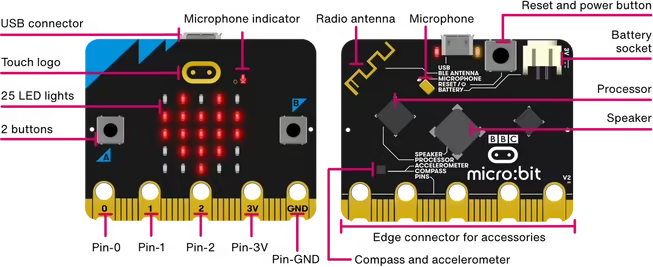
If you’ve not come across one, the micro:bit is a pocket-sized computer designed to teach coding and other STEM-related subjects. It’s based on an ARM Cortex microprocessor, has a 5x5 LED matrix display, two buttons, a speaker, and sensors that can measure temperature and movement. Since its launch in 2015, millions of micro:bits have been used in classrooms across the world, with students programming them using micro:bit’s Python IDE and Microsoft’s MakeCode.
The micro:bit MCP Server in Action
At the Aug 2025 AI Tinkerers event in Seattle, I demonstrated an MCP server for the micro:bit. Here’s a short video of what students can use it for:
As shown in the video, the prototype supports a few different interactions:
- Displaying an image on the 5x5 matrix display
- Displaying a scrollable message
- Playing music/notes
- Getting the temperature
- Waiting for one of the buttons to be pressed
How it Works
The prototype uses Gradio to display a basic chat interface for the student, and the OpenAI Agent SDK, connecting to a GPT-4o endpoint. When the student opens the UI, it starts a new instance of the micro:bit MCP server and connects to the device via a serial port.
As the student chats with the LLM, if they ask a question or make a request that doesn’t interact with the micro:bit, the LLM responds as normal. For example, if the student says “Hello there!”, the LLM will just respond as normal without accessing the device.
This changes, however, if the student asks for something that requires interaction with the micro:bit: for example, “Display ‘Hello there!’ on the micro:bit display”. In this case, the agent will determine if the MCP server exposes a suitable method - and if so, will call the corresponding function. (There’s a lot more detail of how this works under the covers that I won’t go into in this article.) The local method then sends a data message over the serial connection to the micro:bit to perform the required action.
How could this be used in the classroom?
As I’ve shown this to others, I’ve seen a couple of different use cases emerge.
First, students can explore using the functionality of the micro:bit as a precursor for writing code. The micro:bit Python IDE supports a REPL (Read-Eval-Print-Loop) today. This LLM-based approach could evolve into a “Smart REPL” to allow students to test what the micro:bit can and cannot do using natural language.
The second is to enable students to explore the structure of MicroPython programs and how they interact with the device. For example, a student could ask the LLM to “display a bouncing ball on the micro:bit” and then examine the generated code to debug and explore how this works.
What’s Next?
This was very much a v0.1 prototype. (Something you’ll agree with, should you look at my code!) It demonstrated potential, however, and could be interesting to expand in three areas:
Support deploying code to the micro:bit
The serial interface works well for basic tasks (e.g., “display a heart”), but MCP isn’t asynchronous. This makes it hard to support long-running or interactive scenarios on the device (e.g., “display a bouncing ball” or “display an interactive graph based on the input from the microphone”).
To support this, an interesting angle would be to have the MCP server write and deploy MicroPython code directly to the device. For simple tasks, this could be a one-liner (e.g., display.scroll('Hello')). For more complex tasks, this could be more elaborate.
MCP Server running in the browser
The current prototype requires local Python, connected to the device via the serial PyPI package. This was perfect for building the prototype, but any student deployment should be web-based, accessing the device via WebUSB. The web interface should still support the student’s ability to explore any generated code, however.
Offline SLMs
Using a hosted LLM such as GPT-5 could be a barrier for schools that don’t have access. It also adds friction to the process - i.e., getting an API key and setting it up for each student. In addition, the value of using an LLM to interact with a device isn’t really the “world knowledge” it contains. Instead, it’s the ability for the model to recognize an instruction that needs to invoke a local tool.
It would be interesting to explore using an SLM (Small Language Model), a much smaller model that has been trained for tool use that can run offline, potentially even on WebGPU within the browser. Doing so would enable students to have the same interaction without the cost and network requirements of a hosted model.
Conclusion
Overall, this was fun to put together and I’m looking forward to working on a “v2” of the prototype that builds on many of these ideas. I believe this approach is just starting to scratch the surface of how students could use LLMs to interact with classroom-based devices in a unique and fun way.